
INTRO
Windows Filtering Platform (WFP) is a set of system services in Windows Vista and later that allows Windows software to process and filter network traffic (https://learn.microsoft.com/en-us/windows/win32/fwp/windows-filtering-platform-start-page).
Let’s figure out something about WFP:
WFP
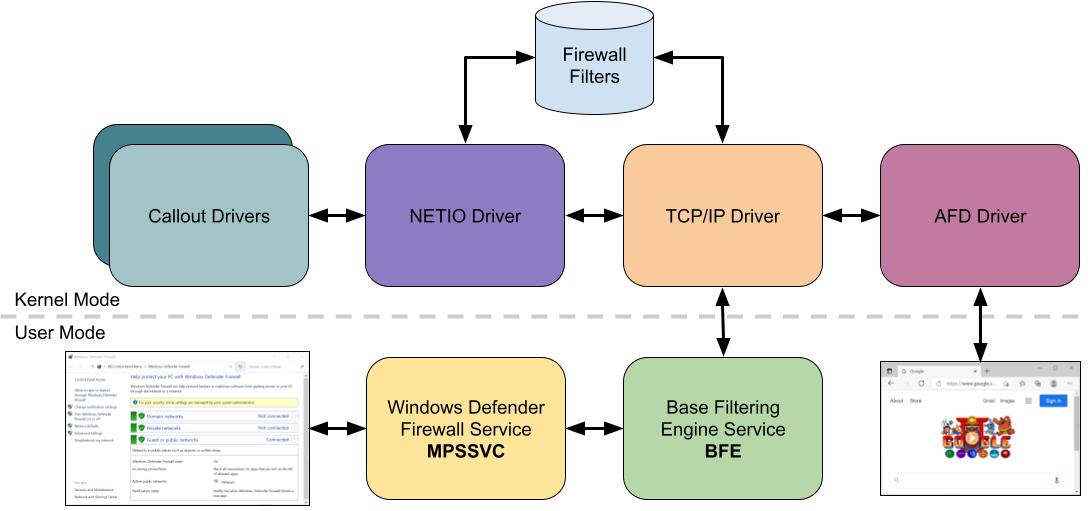
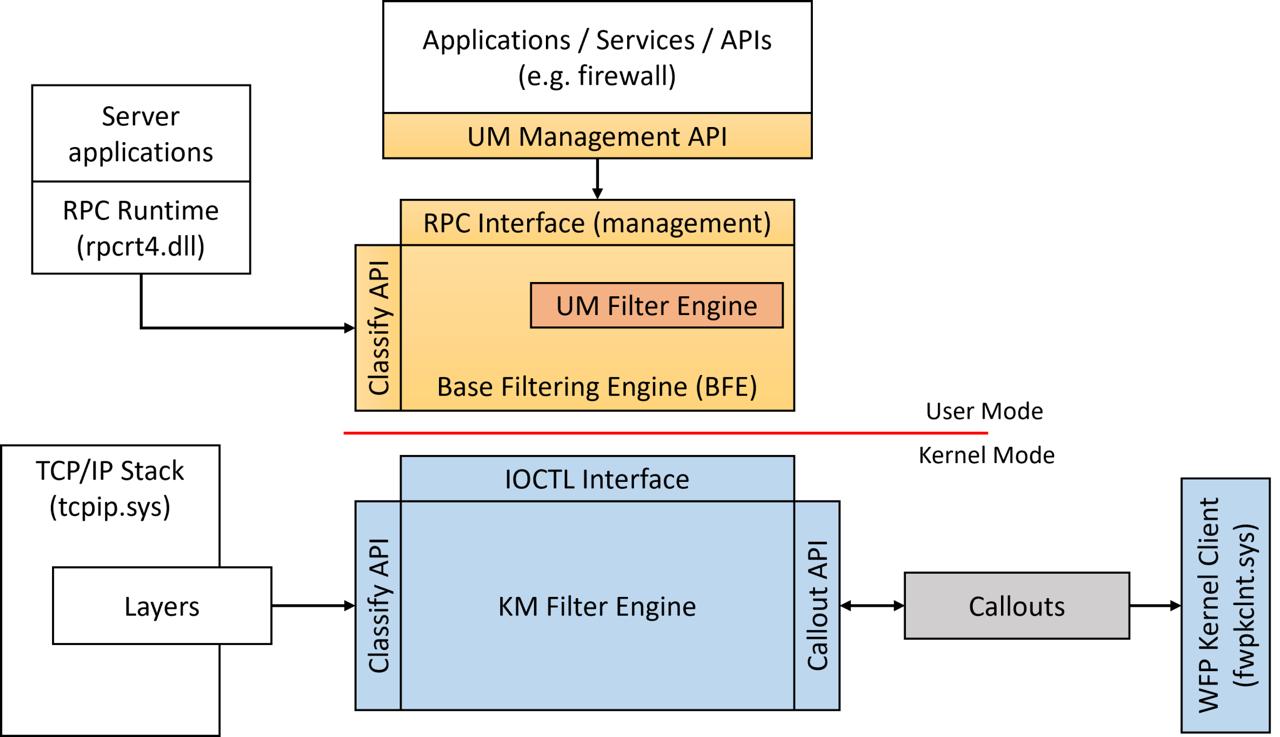
Overall WFP’s main components are:
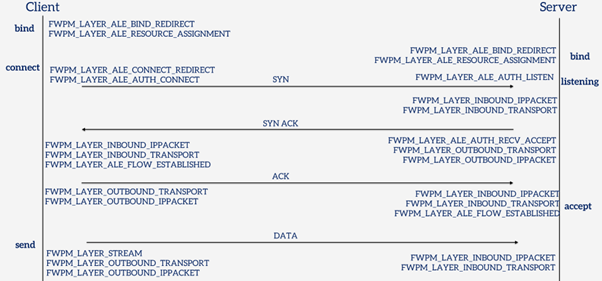
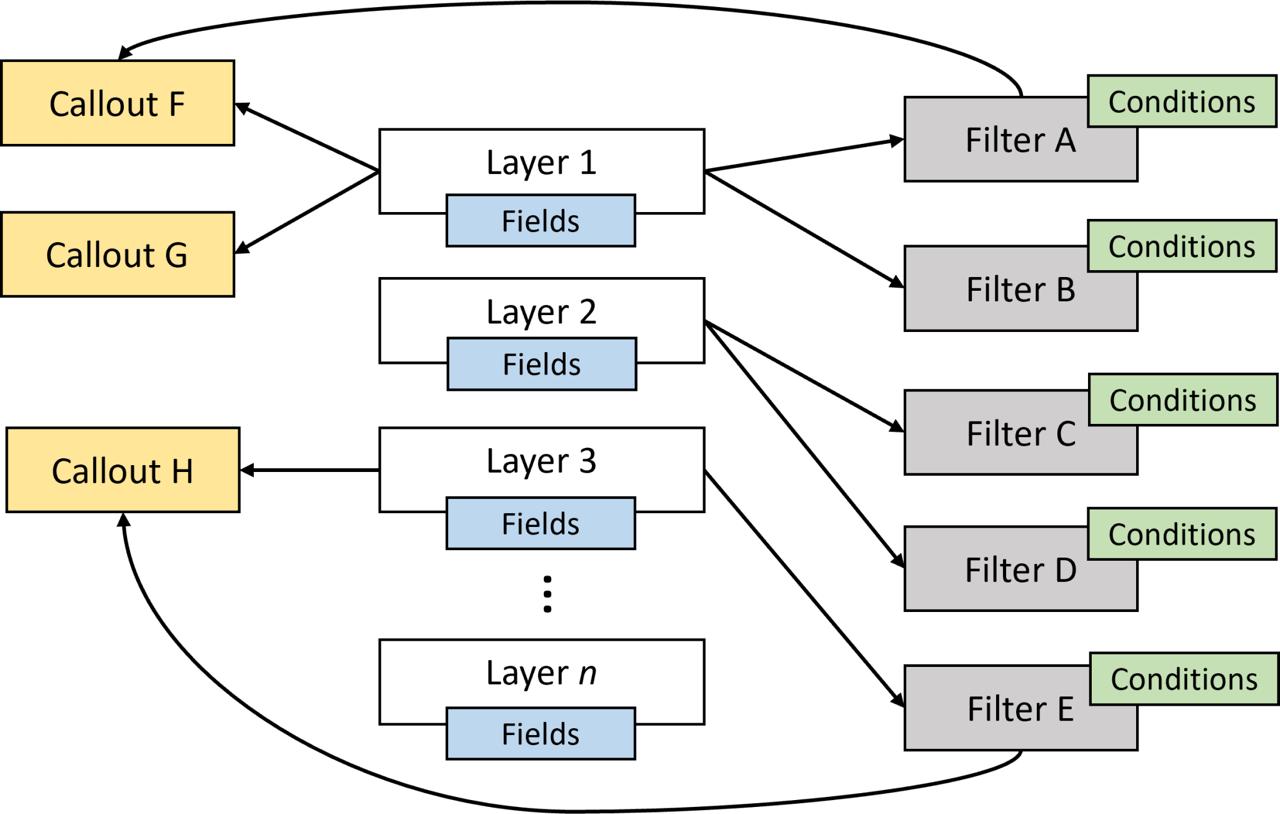
Filter Engine (kernel mode) — implemented in netio.sys, the filter engine evaluates every network event against a set of registered filters. When a packet or connection event occurs, the engine walks through matching filters in weight order and produces a verdict: permit, block, or defer to a callout for further inspection.
Base Filtering Engine (BFE) — a user-mode service (bfe.dll, hosted in svchost.exe) that acts as the policy store and management plane. BFE owns the persistent filter database. When you add a firewall rule through Windows Firewall, Group Policy, or the Fwpm* API, BFE validates it, stores it, and pushes it down to the kernel filter engine. BFE also manages provider and sublayer registration, enforces access control on filter objects, and handles transactions.
Callout Drivers — kernel-mode drivers that register callout functions with the filter engine. When a filter’s action is “callout” rather than simple permit/block, the engine invokes the registered callout, handing it the packet or connection metadata (and sometimes the raw data).
User-Mode API (fwpuclnt.dll) — Win32 API for managingWFP objects from user mode. Applications use FwpmEngineOpen, FwpmFilterAdd, FwpmSubLayerAdd, and related functions to interact with BFE and, through it, the kernel filter engine.
Introduction to the Windows Filtering Platform (WFP):
https://scorpiosoftware.net/2022/12/25/introduction-to-the-windows-filtering-platform
Evasive and privilege escalation technique that abuses the WFP with the analysis of the various components of the WFP:
https://www.deepinstinct.com/blog/nofilter-abusing-windows-filtering-platform-for-privilege-escalation
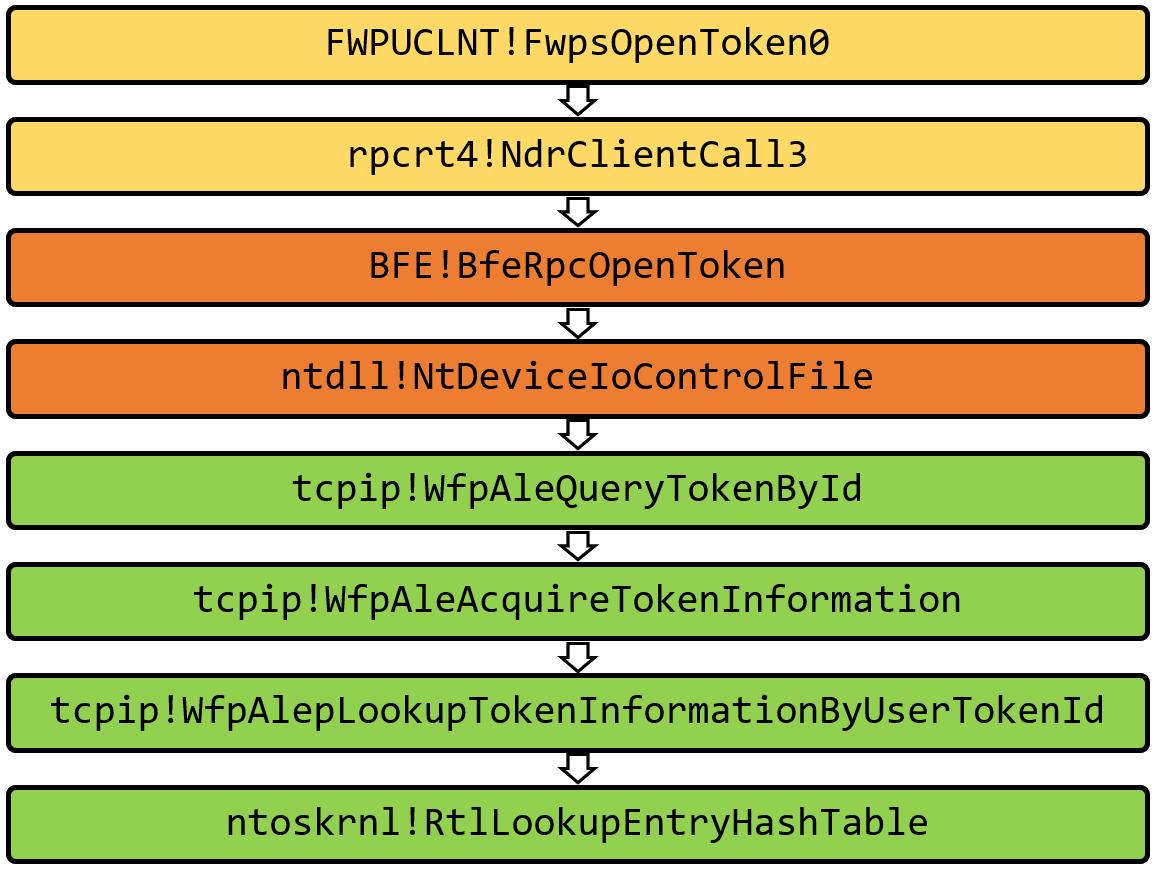
Abusing WFP for EDR Evasion:
https://jacobkalat.com/edr-evasion/2025/02/12/WFP-Wizardry-Abusing-WFP-for-EDR-Evasion
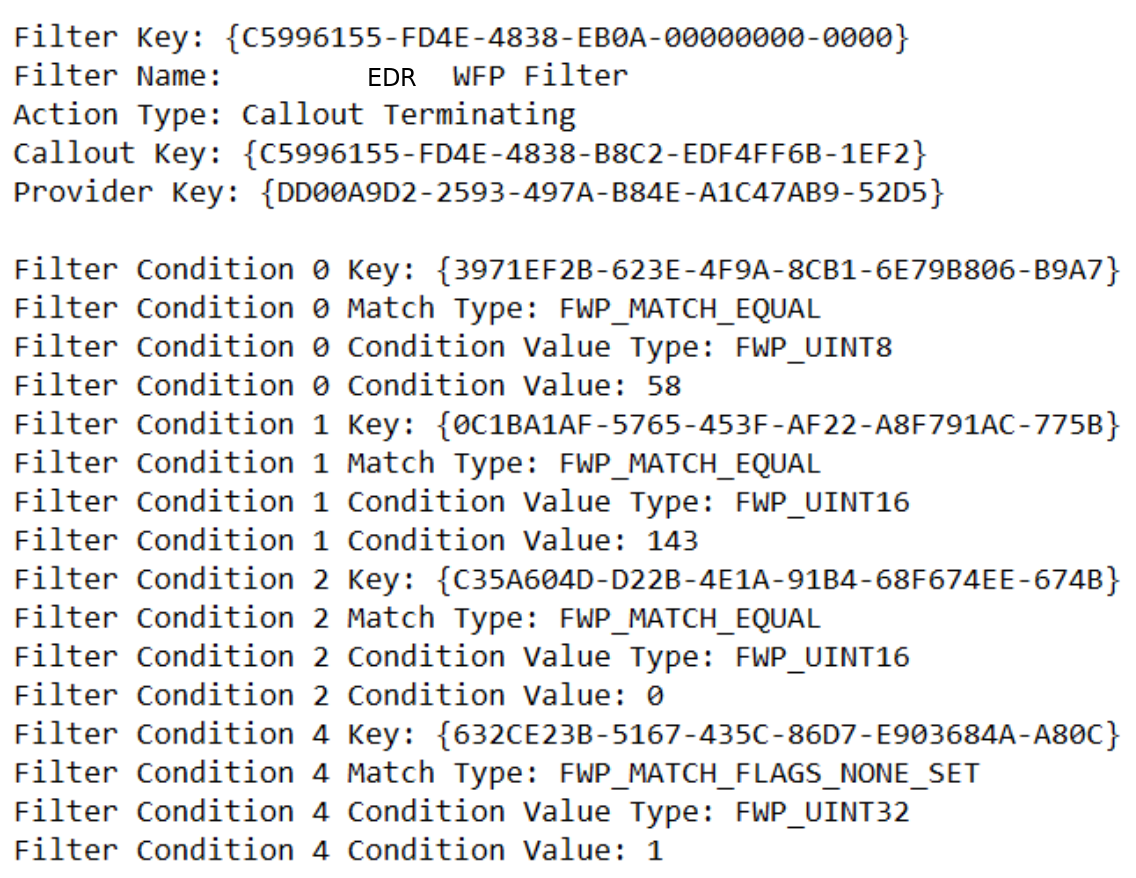
Network Access in Windows AppContainers:
https://projectzero.google/2021/08/understanding-network-access-windows-app
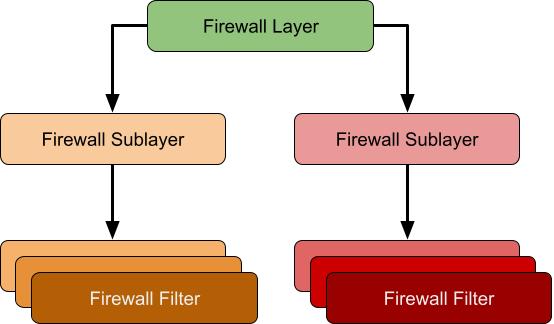
Guided tour inside WinDefender’s network inspection WFP driver:
https://blog.quarkslab.com/guided-tour-inside-windefenders-network-inspection-driver
Finding WFP Callouts
WFP callouts are functions that are registered by kernel mode WFP filters with the networking stack (NETIO.sys). Here is the technique to find a list of WFP callouts registered on the system.
A driver registers a callout with the filter engine using Reversing FwpsCalloutRegister:
typedef struct FWPS_CALLOUT0_
{
  GUID                                calloutKey;
  UINT32                              flags;
  FWPS_CALLOUT_CLASSIFY_FN0           classifyFn;
  FWPS_CALLOUT_NOTIFY_FN0             notifyFn;
  FWPS_CALLOUT_FLOW_DELETE_NOTIFY_FN0 flowDeleteFn;
} FWPS_CALLOUT0;
Reversing FwpsCalloutRegister we will end up with the following sequence of calls :
fwpkclnt!FwpsCalloutRegister -> fwpkclnt!FwppCalloutRegister -> NETIO!KfdAddCalloutEntry -> NETIO!FeAddCalloutEntry
The variable netio!gWfpGlobal is the starting point for most WFP data structures. And there’s FeGetWfpGlobalPtr function exported by NETIO.SYS that will return the address of gWfpGlobal:
__int64 FeGetWfpGlobalPtr()
{
    return gWfpGlobal;
}
0: kd> dp   netio!gWfpGlobal L1
fffff880`017536a0  fffffa80`03718000 ;pointer to the WFP global structure
The number of callouts and the pointer the array of callout structures is stored in this global table. To find the offset of these fields:
0: kd> u netio!FeInitCalloutTable
NETIO!FeInitCalloutTable:
fffff880`01732a60 fff3            push    rbx
fffff880`01732a62 4883ec20        sub     rsp,20h
fffff880`01732a66 488b05330c0200  mov     rax,qword ptr [NETIO!gWfpGlobal (fffff880`017536a0)]
fffff880`01732a6d 33c9            xor     ecx,ecx
fffff880`01732a6f ba57667043      mov     edx,43706657h
fffff880`01732a74 48898848050000  mov     qword ptr [rax+548h],rcx ;Offset of number of Entries
fffff880`01732a7b 48898850050000  mov     qword ptr [rax+550h],rcx ;Offset of pointer to array of callout structures
fffff880`01732a82 4c8b05170c0200  mov     r8,qword ptr [NETIO!gWfpGlobal (fffff880`017536a0)]
The find the number of built in layers and the pointer to the array of callout structures:
0: kd> dq fffffa80`03718000 + 548 L1
fffffa80`03718548  00000000`0000011e ;number of entries

0: kd> dps fffffa80`03718000 + 550 L1
fffffa80`03718550  fffffa80`0509c000 ;Pointer to array of callout structures
To confirm that callout array pointer is correct:
0: kd> !pool fffffa80`0509c000
Pool page fffffa800509c000 region is Nonpaged pool
*fffffa800509c000 : large page allocation, Tag is WfpC, size is 0x4790 bytes
            Pooltag WfpC : WFP callouts, Binary : netio.sys
To find the size of each structure in this array:
0: kd>  u NETIO!InitDefaultCallout
NETIO!InitDefaultCallout:
fffff880`01730230 fff3            push    rbx
fffff880`01730232 4883ec20        sub     rsp,20h
fffff880`01730236 4c8d05ab320200  lea     r8,[NETIO!gFeCallout (fffff880`017534e8)]
fffff880`0173023d ba57667043      mov     edx,43706657h
fffff880`01730242 b940000000      mov     ecx,40h ;size of each entry in the array allocated from NPP
fffff880`01730247 e8f4eefdff      call    NETIO!WfpPoolAllocNonPaged (fffff880`0170f140)
fffff880`0173024c 488bd8          mov     rbx,rax
fffff880`0173024f 4885c0          test    rax,rax
But there is also more elegant way to find callouts entries : there’s an undocumented export named NETIO!KfdGetRefCallout, it can be used to get a pointer to the callout entry structure associated with a specific callout id, without using any offsets.
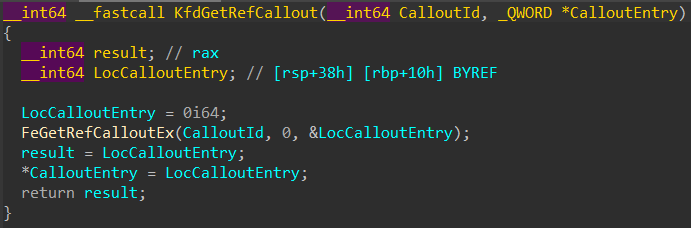
Implementation is here: WFPCalloutReserach
More info is here: WFPCalloutReserach
WFP And EDRSilencer
EDRSilencer is the red team tool that leverages WFP to block AV/EDR telemetry reports.
EDRSilencer uses the documented Fwpm* user-mode API:
- Enumerate running processes — CreateToolhelp32Snapshot + Process32Next to walk the process list, matching against a hardcoded table of known EDR executable names
- Obtain the WFP app ID — for each matched EDR process, construct the FWP_BYTE_BLOB application identifier that WFP uses for per-application filtering. The standard API FwpmGetAppIdFromFileName0 calls CreateFileW internally to open the target executable, which can fail if the EDR’s minifilter denies handle creation to its own processes. EDRSilencer works around this by constructing the app ID blob manually — converting the NT device path format without ever touching CreateFileW
- Add blocking filters — for each EDR process, add FWP_ACTION_BLOCK filters on both FWPM_LAYER_ALE_AUTH_CONNECT_V4 and FWPM_LAYER_ALE_AUTH_CONNECT_V6, conditioned on the app ID. The filter weight is set to maximum to ensure the block takes precedence over any permit filters in the same sublayer
- Persist the filters — the filters are added as persistent (not FWPM_SESSION_FLAG_DYNAMIC), so they survive across reboots. Even if EDRSilencer is discovered and removed, the blocking filters remain active until explicitly deleted
Implementation is here: EDRSilencer
EDRPrison
EDRPrison leverages a legitimate WFP callout driver, WinDivert, to effectively silence EDR systems.
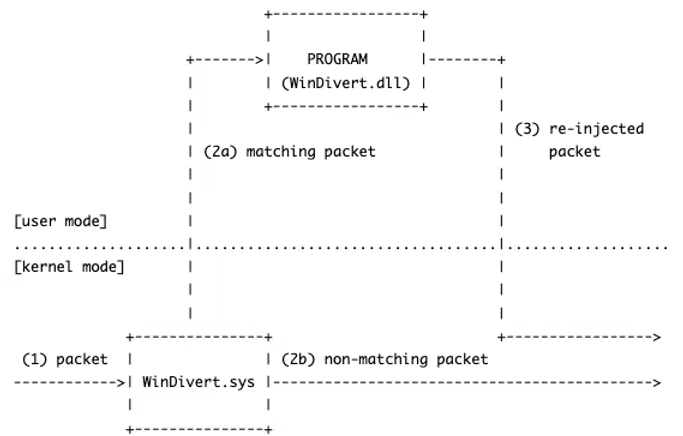
Unlike its predecessors, EDRPrison installs and loads an external legitimate WFP callout driver instead of relying solely on the built-in WFP.
Additionally, it blocks outbound traffic from EDR processes by dynamically adding runtime filters without directly interacting with the EDR processes or their executables.
Implementation is here: EDRPrison
More info is here: EDRPrison