
INTRO
An NDIS Lightweight Filter (LFW) driver is one of several driver models to monitor and filter network packets in Windows. They operate at Layer 2 (data link layer) and can perform tasks such as packet inspection, modification, dropping, or injection.
A filter driver communicates with NDIS and other NDIS drivers through the NDIS library. The NDIS library exports a full set of functions (NdisFXxx) that encapsulate all of the operating system functions that a filter driver must call. The filter driver, in turn, must export a set of entry points (FilterXxx functions) that NDIS calls for its own purposes, or on behalf of other drivers, to access the filter driver.
A filter module is an instance of a filter driver that typically layered between miniport adapters and protocol bindings [ ndis-filter-drivers ]:
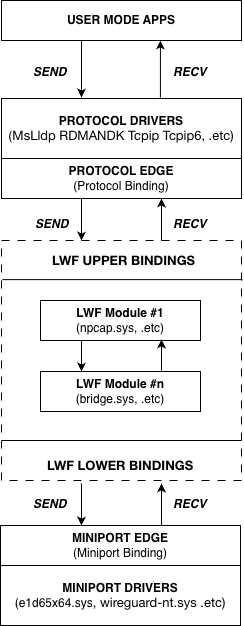
LFW drivers are widely used in VPN, EDR and other solutions.
But what if we have our private miniport driver and don’t want the traffic of this miniport gets inspected or modified by third-party LWFs?
Let’s figure out how LFWs get binded to miniport drivers and loaded:
- LWF INF
- Network Configuration Interfaces
- Bindings Registry Entries
- Netsetup2
- NDIS Binding
- LWF Registration
- ndisCheckForNdisTestBindingsOnAllMiniports
LWF INF
NDIS LWF bindings define how NDIS filter drivers connect and interact within the Windows network stack.
LWFs are installed as network services using a single setup information (INF) file, which the Windows configuration manager processes to determine binding compatibility and store configurations.
Key INF settings that control bindings include:
-
FilterClass: a required value that specifies the filter’s functional class and determines its position in the filter stack relative to other LWFs. Common values include:
-‘compression’ or ‘encryption’ (for data modification)
-‘scheduler’ or ‘loadbalance’ (for traffic management)
-‘failover’ (for redundancy)
This influences binding order: NDIS stacks filters from lowest to highest class during attachment. -
FilterMediaTypes: a value listing supported network media types (e.g., ‘ethernet’, ‘wlan, ‘nativewifi’).
Bindings only occur to adapters matching these types; for example, a Wi-Fi-specific LWF might specify ‘wlan’ to avoid binding to Ethernet adapters. -
Ndi\Interfaces: defines binding interfaces via UpperRange and LowerRange values.
-UpperRange: Interfaces the LWF exposes at its top edge (e.g., ‘ndis5’ for general NDIS protocols, or protocol-specific like ‘ndis5ip’ for TCP/IP-only). This allows upper-layer protocols (e.g., TCP/IP) to bind to the filter.
-LowerRange: Interfaces the LWF binds to at its bottom edge (e.g., ‘ethernet’, ‘wlan’, or ndis5’ for non-specific).
Values as UpperRange=noupper and LowerRange=nolower allow the filter to bind above and below all other components
Example INF snippet (Ndi installation support section):
;-------------------------------------------------------------------------
; Installation Section
;-------------------------------------------------------------------------
[Install]
AddReg=LWF_Ndi
; All LWFs must include the 0x40000 bit (NCF_LW_FILTER). Unlike miniports, you
; don't usually need to customize this value.
; Added flags NCF_HIDDEN | NCF_NOT_USER_REMOVABLE to avoid manual intervention.
Characteristics=0x40028
NetCfgInstanceId="{A54A4CFA-050D-4DC4-9D29-04E50393CB9B}"

;-------------------------------------------------------------------------
; Ndi installation support
;-------------------------------------------------------------------------
[LWF_Ndi]
HKR, Ndi,Service,,"SWSLWF"
HKR, Ndi,CoServices,0x00010000,"SWSLWF"
; The FilterClass controls the order in which filters are bound to the underlying miniport.
HKR, Ndi,FilterClass,, encryption
; Specify whether you have a Modifying or Monitoring filter.
; For a Monitoring filter, use this:
;     HKR, Ndi,FilterType,0x00010001, 1 ; Monitoring filter
; For a Modifying filter, use this:
;     HKR, Ndi,FilterType,0x00010001, 2 ; Modifying filter
HKR, Ndi,FilterType,0x00010001,2
HKR, Ndi\Interfaces,UpperRange,,"noupper"
HKR, Ndi\Interfaces,LowerRange,,"ndis5,ndis4"
HKR, Ndi\Interfaces, FilterMediaTypes,,"ethernet, wan, ppip, bluetooth, ndis5, nolower"
Installation of the LWFs requires the INetCfg* APIs [ Network Configuration Interfaces ] or the netcfg.exe tool [ NetCfg ]. During installation, the configuration manager validates bindings based on the INF file settings and generates a list of applicable filter modules for each miniport adapter [ NDIS filter driver installation ] .
Network Configuration Interfaces
Network Configuration Interfaces (INetCfg) are a family of COM objects in Windows that provide programmatic access to network configuration and installation.
INetCfg is the root interface that provides methods to load basic networking information into memory, apply changes to network configuration, and retrieve network components.
NDIS protocol and filter drivers are installed by calling into the INetCfg family of Network Configuration Interfaces [ NetCfg ].
INetCfg family allows:
- Enumerate network adapters, protocols, clients, and services
- Install and uninstall network components
- Enable/disable bindings between components
- Modify network component settings
- Query binding paths between network stack layers
The INetCfg family includes multiple related interfaces:
- INetCfg - root interface for all network configuration
- INetCfgLock - provides locking mechanism for configuration changes
- INetCfgComponent - represents a specific network component
- INetCfgComponentBindings - controls bindings for a component
- INetCfgBindingPath - represents a binding path between components
- INetCfgClass - represents a class of components (adapters, protocols, etc.)
- INetCfgClassSetup - used for installing/removing components
Usage of the INetCfg objects related to binding functionality can be found in bindview.exe tool [ BindView ].
Bindings Registry Entries
All information about NDIS bindings is stored in Windows Registry
Let’s consider example of the bindings registry entries for Realtek 8822CE Wireless LAN 802.11ac PCI-E NIC adapter:
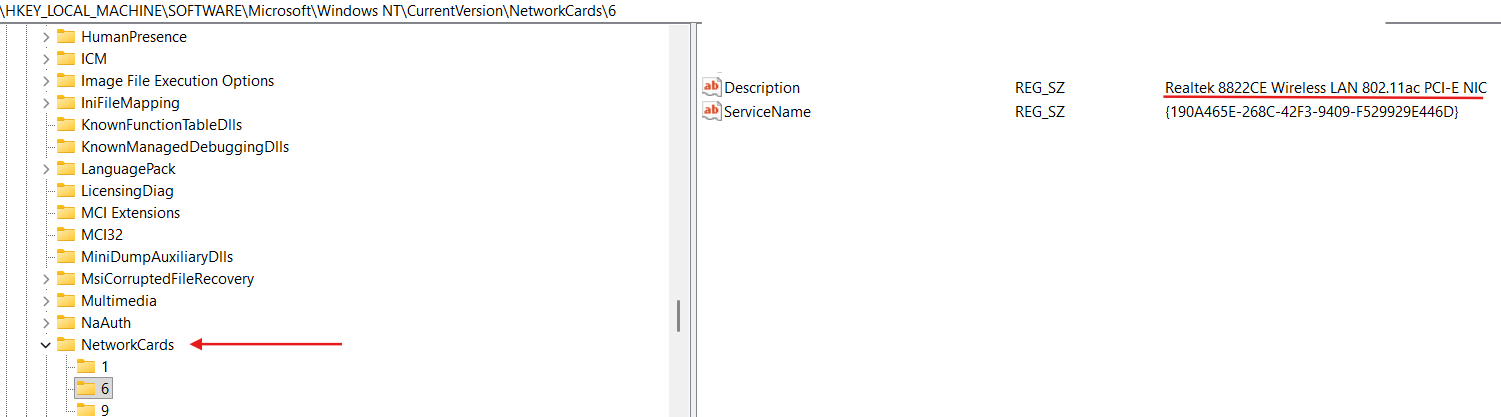
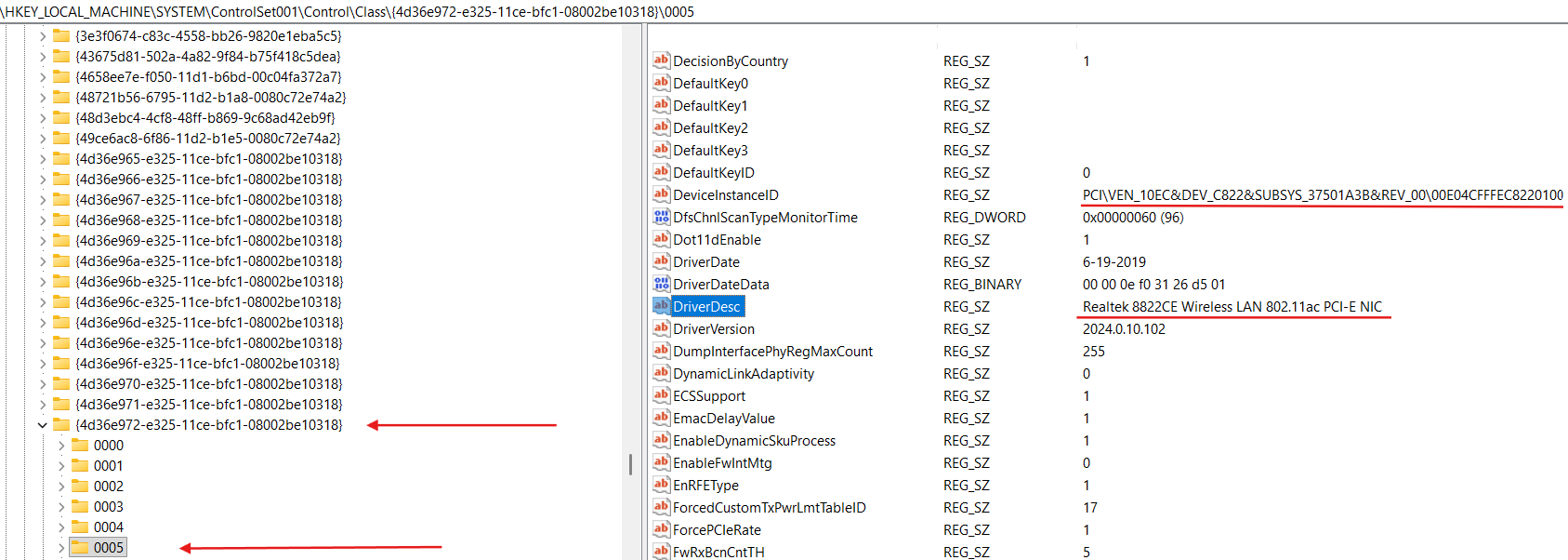
We can see the full description of this NIC in the HKLM\SYSTEM\ControlSet001\Control\Class{4d36e972-e325-11ce-bfc1-08002be10318} registry key (this registry key stands for Network Class devices):
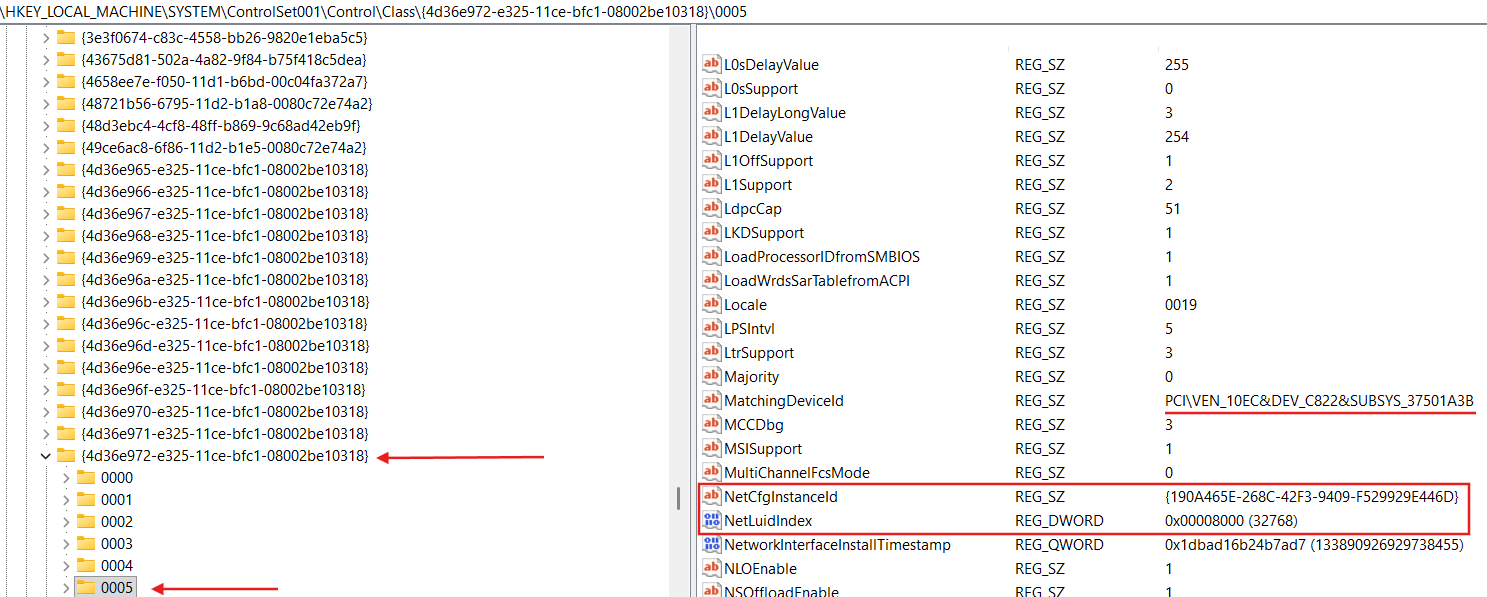
Also we can see that binding information for our NIC is stored in the HKLM\SYSTEM\ControlSet001\Control\Class{4d36e972-e325-11ce-bfc1-08002be10318}\0005\Linkage:
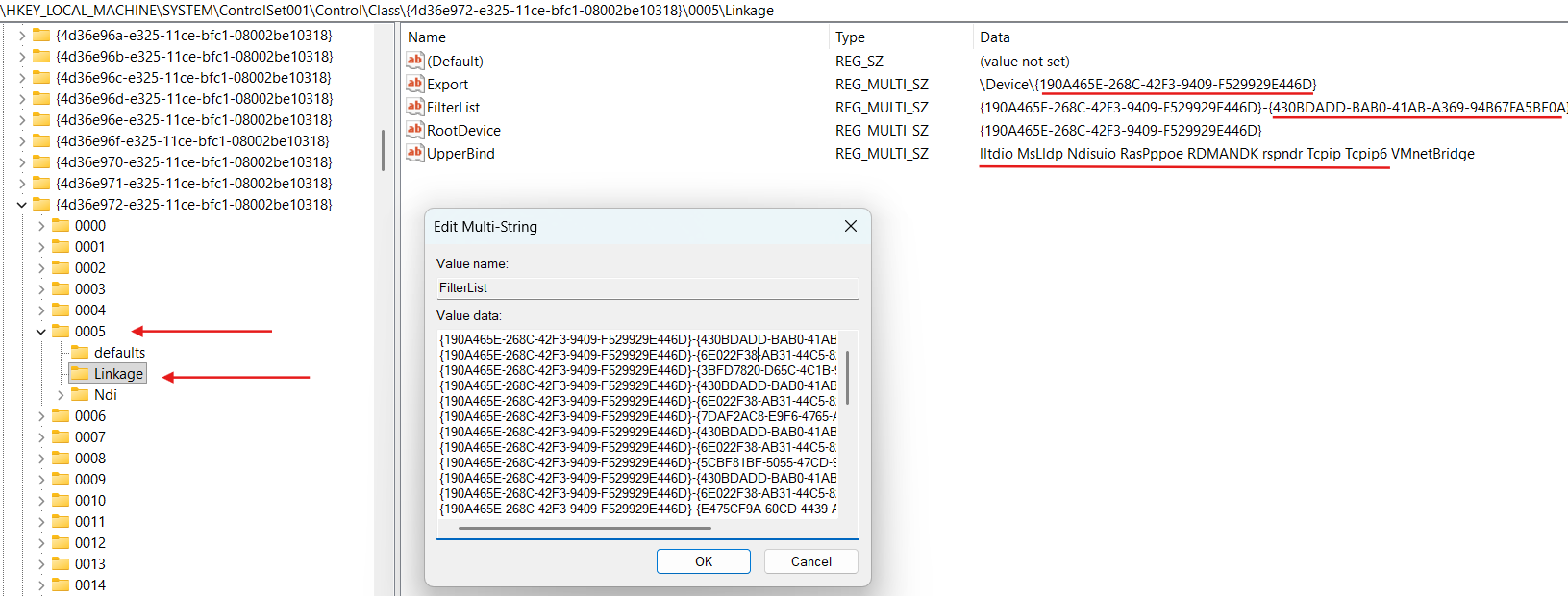
HKLM\SYSTEM\ControlSet001\Control\Class{4d36e972-e325-11ce-bfc1-08002be10318}\0005\Linkage\FilterList contains the list of the LWFs GUIDs (NetCfgInstanceId value in an INF file for LWF).
Overall record as {190A465E-268C-42F3-9409-F529929E446D}-{430BDADD-BAB0-41AB-A369-94B67FA5BE0A} is called binding path, where {190A465E-268C-42F3-9409-F529929E446D} is our NIC NetCfgInstanceId and {430BDADD-BAB0-41AB-A369-94B67FA5BE0A} is some LWF NetCfgInstanceId.
Let’s search for {430BDADD-BAB0-41AB-A369-94B67FA5BE0A} value in the registry:

As we can see {430BDADD-BAB0-41AB-A369-94B67FA5BE0A} is for ndiscap.sys (Microsoft NDIS Packet Capture Filter Driver).
Here is the INF file (ndiscap.inf) for Microsoft NDIS Packet Capture Filter Driver:
;-------------------------------------------------------------------------
; NdisCap.INF -- NDIS Packet Capture Filter Driver
; Copyright (c) Microsoft Corporation.  All rights reserved.
;-------------------------------------------------------------------------
[version]
Signature   = "$Windows NT$"
Class       = NetService
ClassGUID   = {4D36E974-E325-11CE-BFC1-08002BE10318}
Provider    = %Msft%
PnpLockdown = 1
;-------------------------------------------------------------------------
; Installation Section
;-------------------------------------------------------------------------
[Install]
AddReg=Inst_Ndi
Characteristics=0x40038 ; NCF_LW_FILTER | NCF_NO_SERVICE | NCF_NOT_USER_REMOVABLE | NCF_HIDDEN
NetCfgInstanceId="{430BDADD-BAB0-41AB-A369-94B67FA5BE0A}"
;-------------------------------------------------------------------------
; Ndi installation support
;-------------------------------------------------------------------------
[Inst_Ndi]
HKR, Ndi,Service,,"NdisCap"
HKR, Ndi,CoServices,0x00010000,"NdisCap"
HKR, Ndi,HelpText,,"@%%SystemRoot%%\System32\drivers\ndiscap.sys,-5001"
HKR, Ndi,FilterClass,, ms_switch_capture
HKR, Ndi,FilterType,0x00010001,0x00000001
HKR, Ndi\Interfaces,UpperRange,,"noupper"
HKR, Ndi\Interfaces,LowerRange,,"nolower"
HKR, Ndi\Interfaces, FilterMediaTypes,,"ethernet, wlan, ppip, vmnetextension"
HKR, Ndi,FilterRunType, 0x00010001, 2 ; Optional
HKR, Ndi,NdisBootStart, 0x00010001, 0 ; Don't wait for this driver to start at boot
[Strings]
Msft = "Microsoft"
NdisCap_Desc = "Microsoft NDIS Capture"
We can see that NetCfgInstanceId=”{430BDADD-BAB0-41AB-A369-94B67FA5BE0A}” is specified in the Install Section of the INF file, and this LWF can attach to all interfaces (Ndi\Interfaces,UpperRange,,”noupper” and Ndi\Interfaces,LowerRange,,”nolower”) within media types like ‘ethernet’, ‘wlan’, ‘ppip’ and ‘vmnetextension’.
Netsetup2
We have already discovered HKLM\SYSTEM\ControlSet001\Control\NetworkSetup2 registry key in windows-containers-network-isolation, and know it stores various configurations for NDIS:
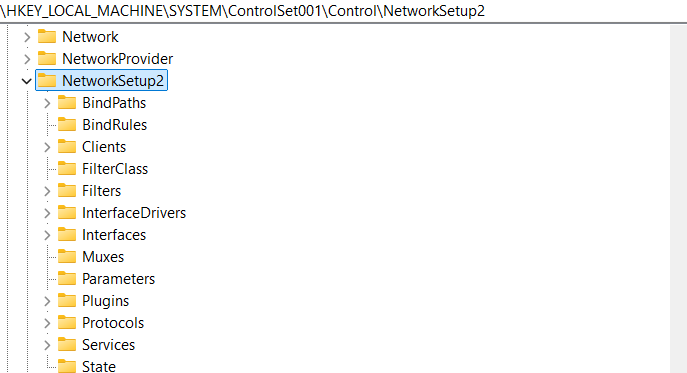
Let’s little bit observer HKLM\SYSTEM\ControlSet001\Control\NetworkSetup2:

As we can see HKLM\SYSTEM\ControlSet001\Control\NetworkSetup2\Interfaces contains necessary interfaces configuration for NDIS.
And here are FilterList and ProtocolList which we already have seen previously in the HKLM\SYSTEM\ControlSet001\Control\Class{4d36e972-e325-11ce-bfc1-08002be10318}\0005\Linkage (where ProtocolList was presented as UpperBind value).
Also we can see here HKLM\SYSTEM\ControlSet001\Control\NetworkSetup2\Filters key:

Obviously HKLM\SYSTEM\ControlSet001\Control\NetworkSetup2\Filters contains necessary filters configuration for NDIS.
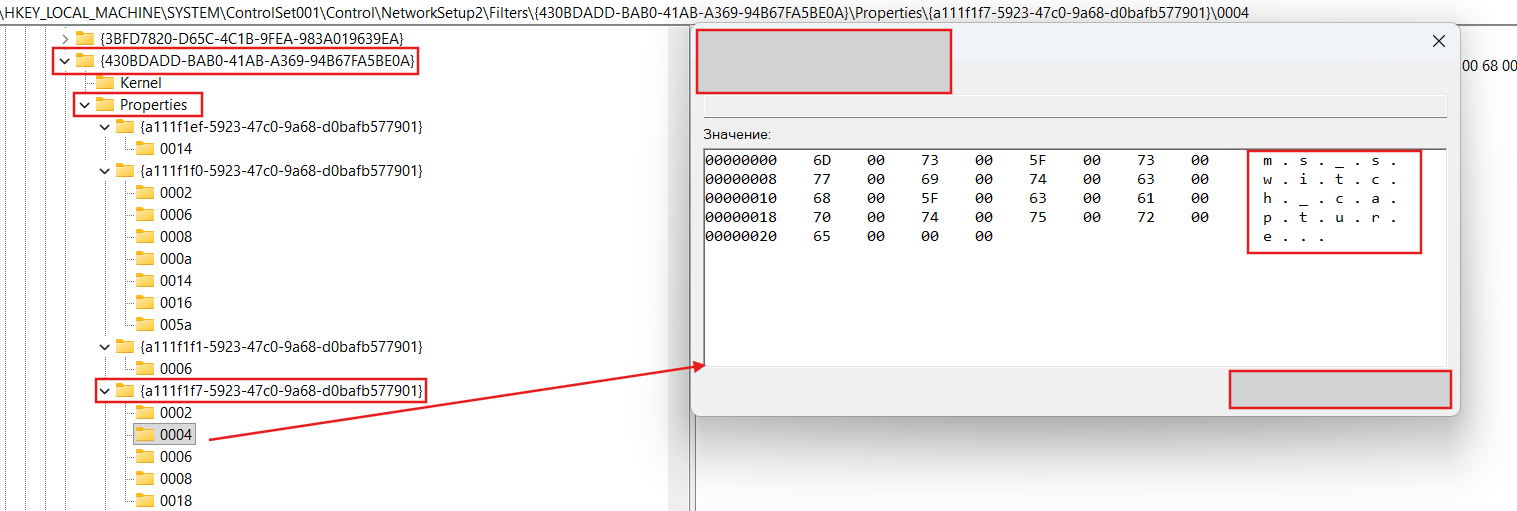
And here is our Microsoft NDIS Packet Capture Filter Driver (NetCfgInstanceId={430BDADD-BAB0-41AB-A369-94B67FA5BE0A}).
Here are also a lot of the some properties for HKLM\SYSTEM\ControlSet001\Control\NetworkSetup2\Filters\430BDADD-BAB0-41AB-A369-94B67FA5BE0A\Properties:
NDIS Binding
NDIS binds objects like Miniport, Interface, Protocol and Filter to each other based on the information stored in the \Registry\Machine\System\CurrentControlSet\Control\NetworkSetup2 registry key. Path to this key is built by netsetupBuildObjectPath function:
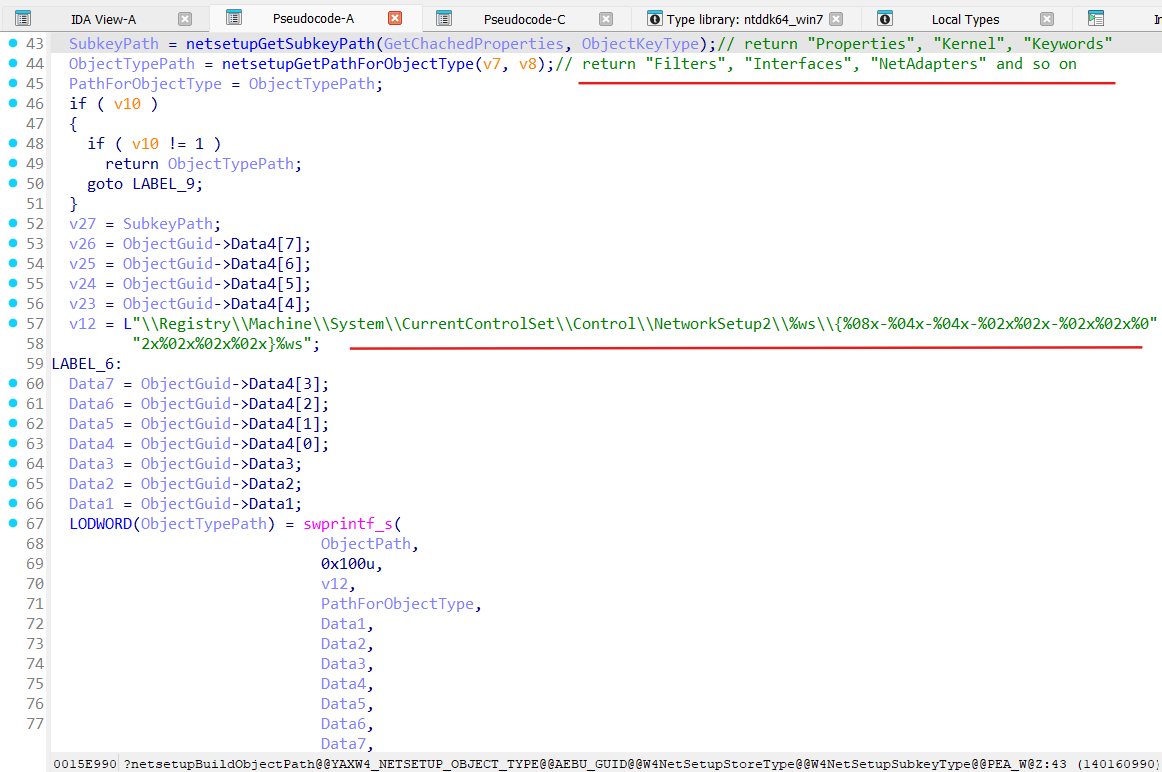
In common this path built by netsetupBuildObjectPath looks like:
HKLM\SYSTEM\ControlSet001\Control\NetworkSetup2{OBJECT-TYPE}{OBJECT-GUID}{OBJECT-PROPERTY}, where:
OBJECT-TYPE - can be “Interfaces”, “Filters”, “Protocols”, “BindPaths”, “Muxes”, .etc
OBJECT-GUID - GUID of the requested object, like InterfaceGuid, FilterGuid, ProtocolGuid, .etc
OBJECT-PROPERTY - can be “Properties”, “Kernel”, “Keywords”, _“CachedRuntimeProperties”
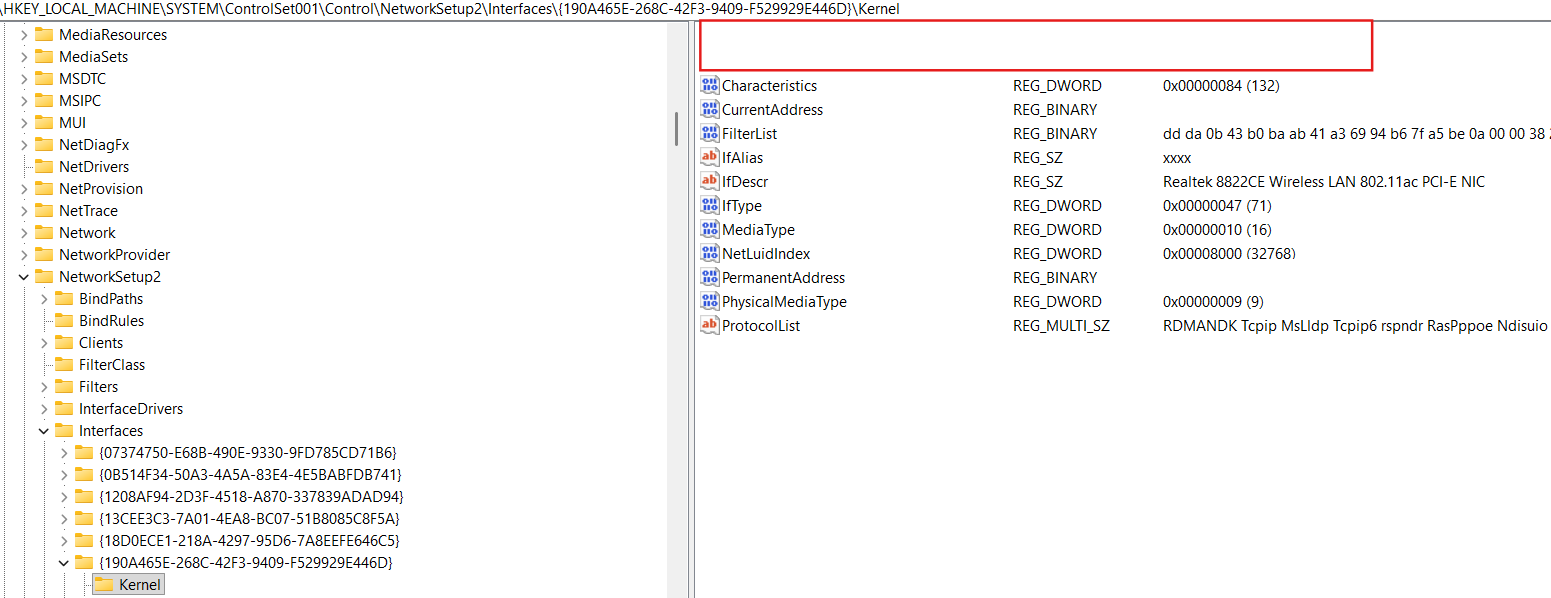
For example full path to Realtek 8822CE Wireless LAN 802.11ac PCI-E NIC adapter interface looks like
HKLM\SYSTEM\ControlSet001\Control\NetworkSetup2\Interfaces{190A465E-268C-42F3-9409-F529929E446D}\Kernel:
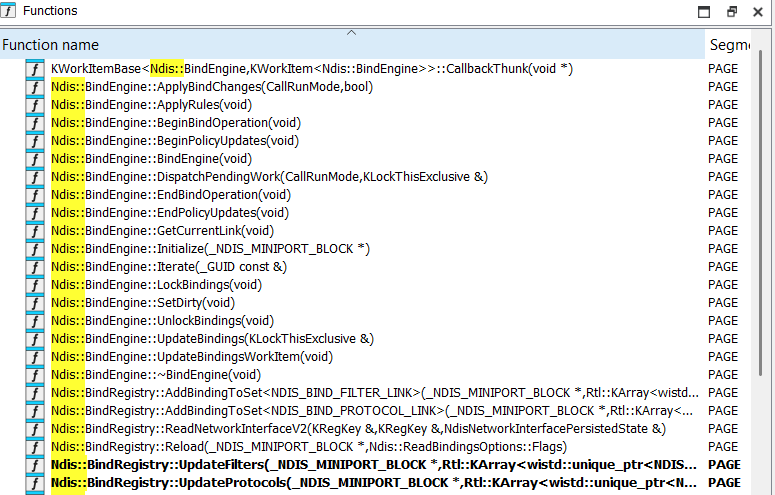
Internally NDIS binding is implemented by objects like Ndis::BindEngine, Ndis::BindStack and Ndis::BindRegistry:
Each Miniport (_NDIS_MINIPORT_BLOCK) has fields Bindings and BindEngine:
struct __cppobj _NDIS_MINIPORT_BLOCK
{
  .....
  Ndis::BindStack Bindings;
  Ndis::BindEngine BindEngine;
  .....
};
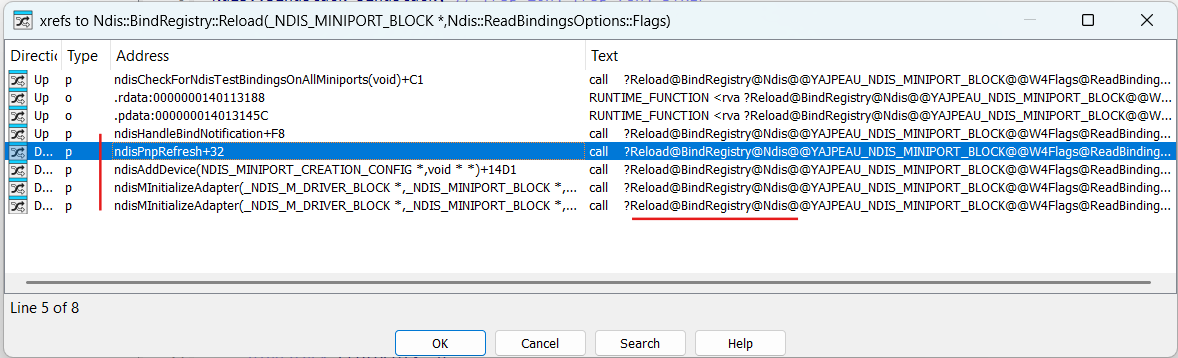
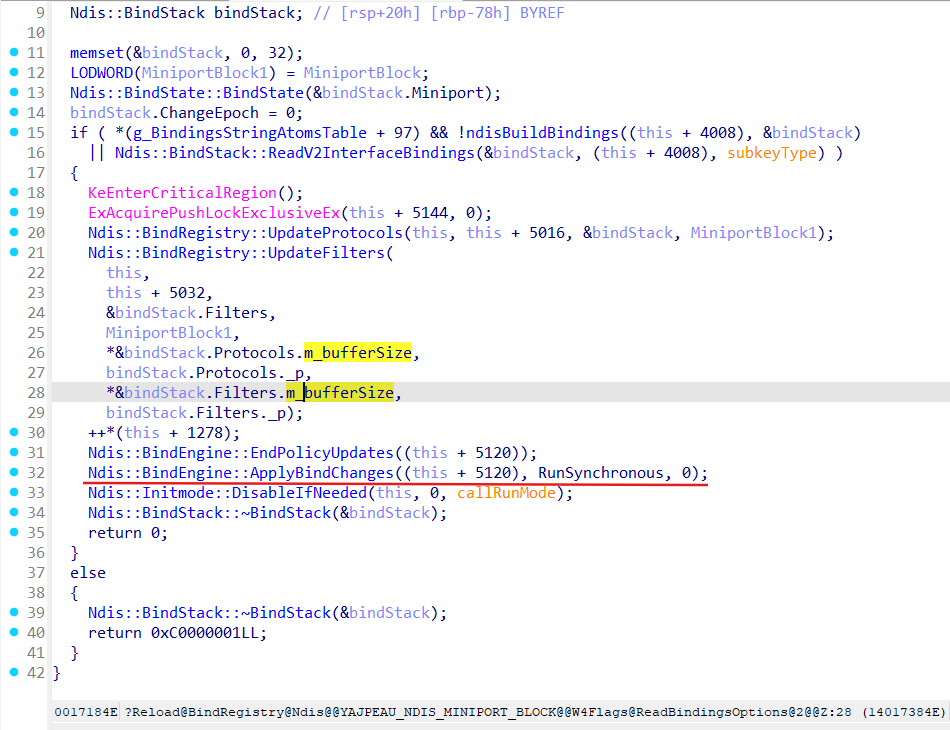
Binding process for a Miniport is trigerred by Ndis::BindRegistry::Reload(_NDIS_MINIPORT_BLOCK *Miniport, Ndis::ReadBindingsOptions::Flags) method:
Let’s analyze Ndis::BindRegistry::Reload:
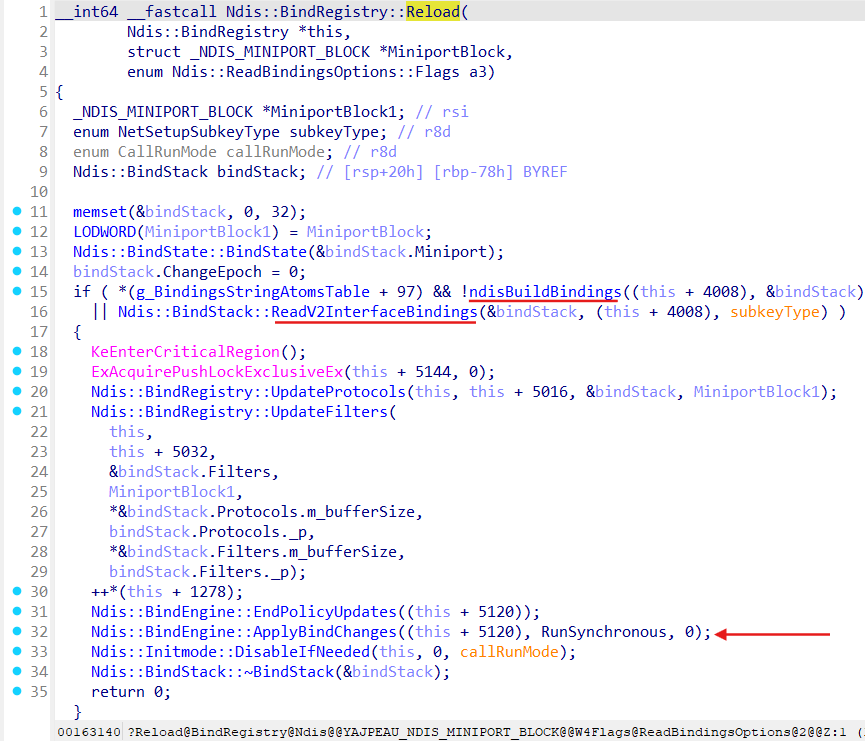
As we can see from the Ndis::BindRegistry::Reload it starts the building of the binding stack for a Miniport ( functions ndisBuildBindings and Ndis::BindStack::ReadV2InterfaceBindings) and run actuall binding process by call of the Ndis::BindEngine::ApplyBindChanges.
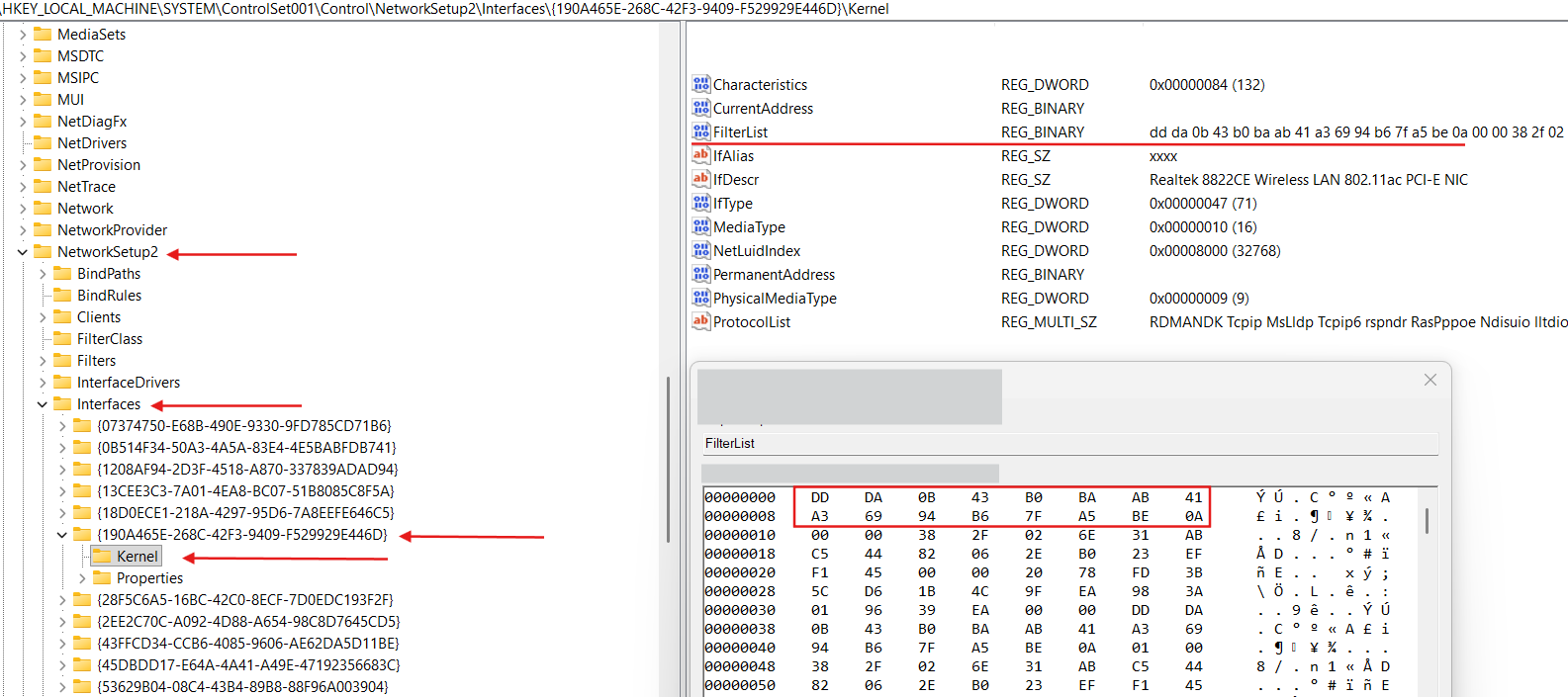
Method Ndis::BindStack::ReadV2InterfaceBindings retrieves binding properties for a Miniport (from the Registry\Machine\System\CurrentControlSet\Control\NetworkSetup2\Interfaces{IFACE-GUID}\FilterList):
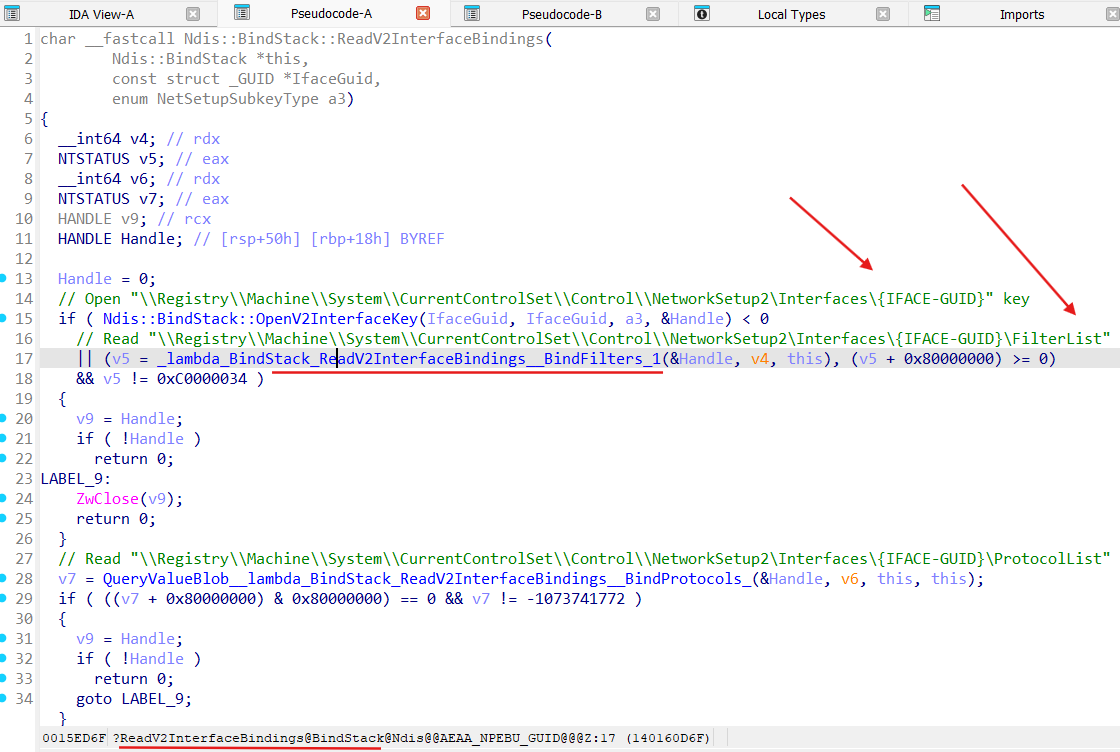
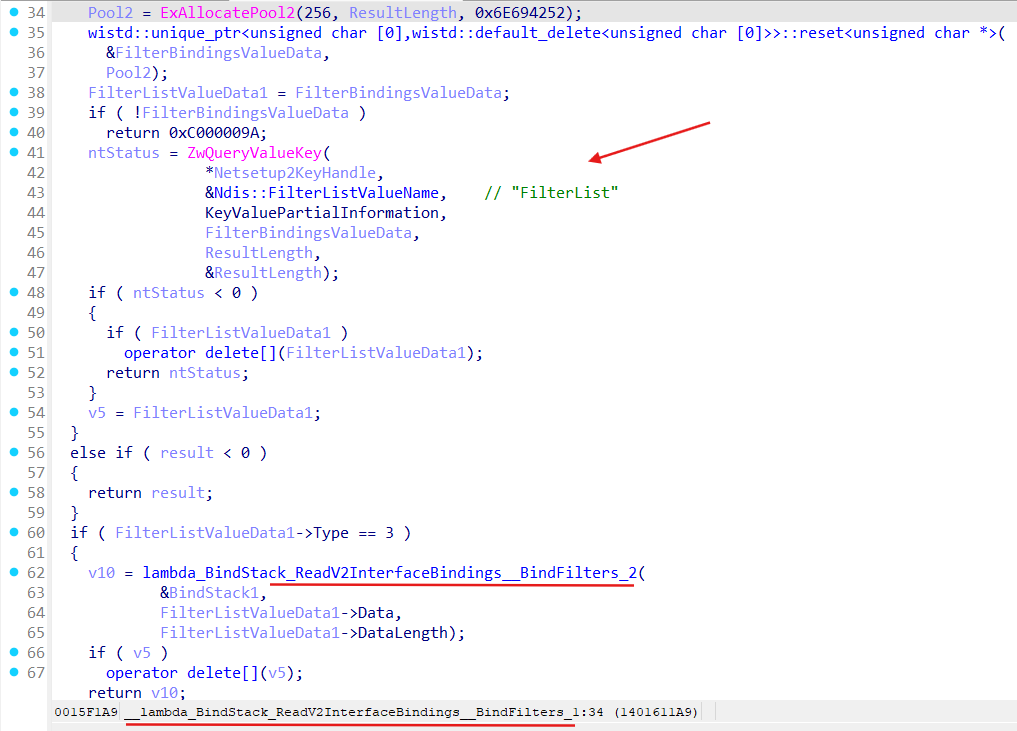
After getting binding properties for a Miniport method Ndis::BindStack::AddStaticFilterBinding gets invoked for each binding path in the binding properties:
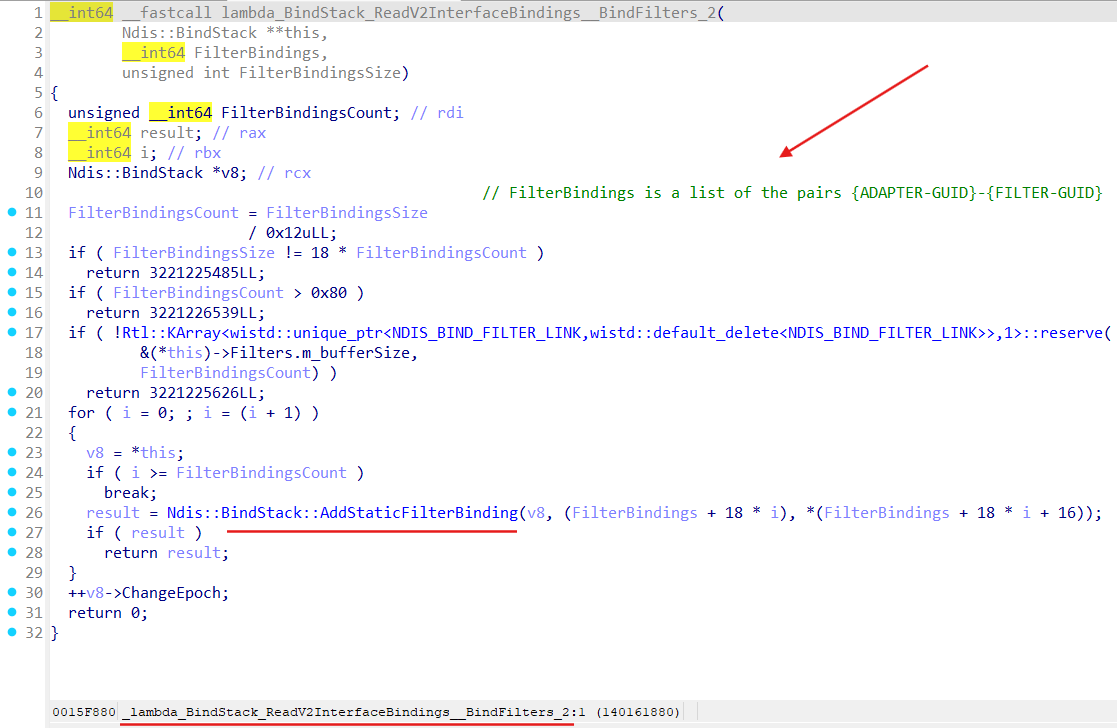
Method Ndis::BindStack::AddStaticFilterBinding builds filter’s link (method Ndis::BindStack::BuildFilterLink) for given LWF and add this link to the Bindings field of the Miniport bindings performed on:
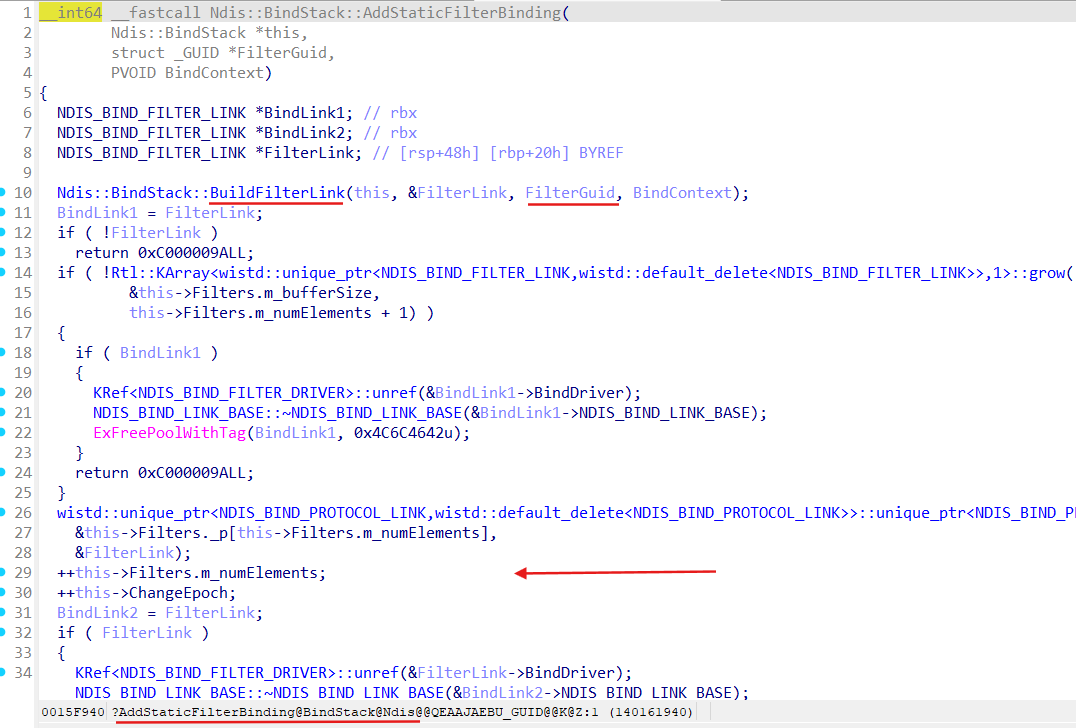
In the registry such binding properties are presented as:
After bind stack gets built for a Miniport, Ndis::BindRegistry run Ndis::BindEngine::ApplyBindChanges:
Method Ndis::BindEngine::ApplyBindChanges invokes Ndis::BindEngine::UpdateBindings, where Ndis::BindEngine::Iterate performs actuall binding LWFs to a Miniport:
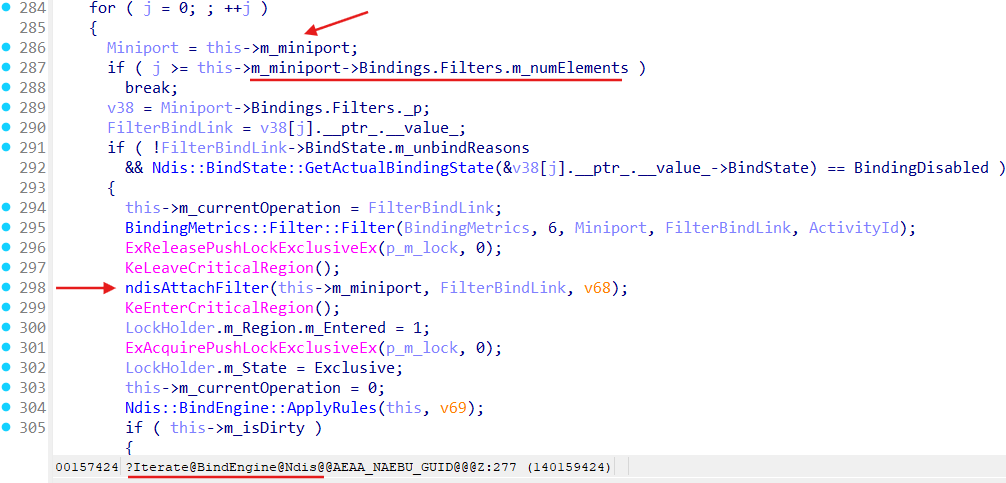
Here we can see that Ndis::BindEngine::Iterate iterates over Miniport BindStack object’s (field Bindings in the _NDIS_MINIPORT_BLOCK strucure) Filters member:
for ( j = 0; ; ++j )
    {
      Miniport = this->m_miniport;
      if ( j >= this->m_miniport->Bindings.Filters.m_numElements )
        break;
      v38 = Miniport->Bindings.Filters._p;
      FilterBindLink = v38[j].__ptr_.__value_;
      if ( !FilterBindLink->BindState.m_unbindReasons
        && Ndis::BindState::GetActualBindingState(&v38[j].__ptr_.__value_->BindState) == BindingDisabled )
      {
        this->m_currentOperation = FilterBindLink;
        BindingMetrics::Filter::Filter(BindingMetrics, 6, Miniport, FilterBindLink, ActivityId);
        ExReleasePushLockExclusiveEx(p_m_lock, 0);
        KeLeaveCriticalRegion();
        ndisAttachFilter(this->m_miniport, FilterBindLink, v68);
        .....
That m_miniport->Bindings.Filters member was filled in the Ndis::BindStack::AddStaticFilterBinding during binding stack building:
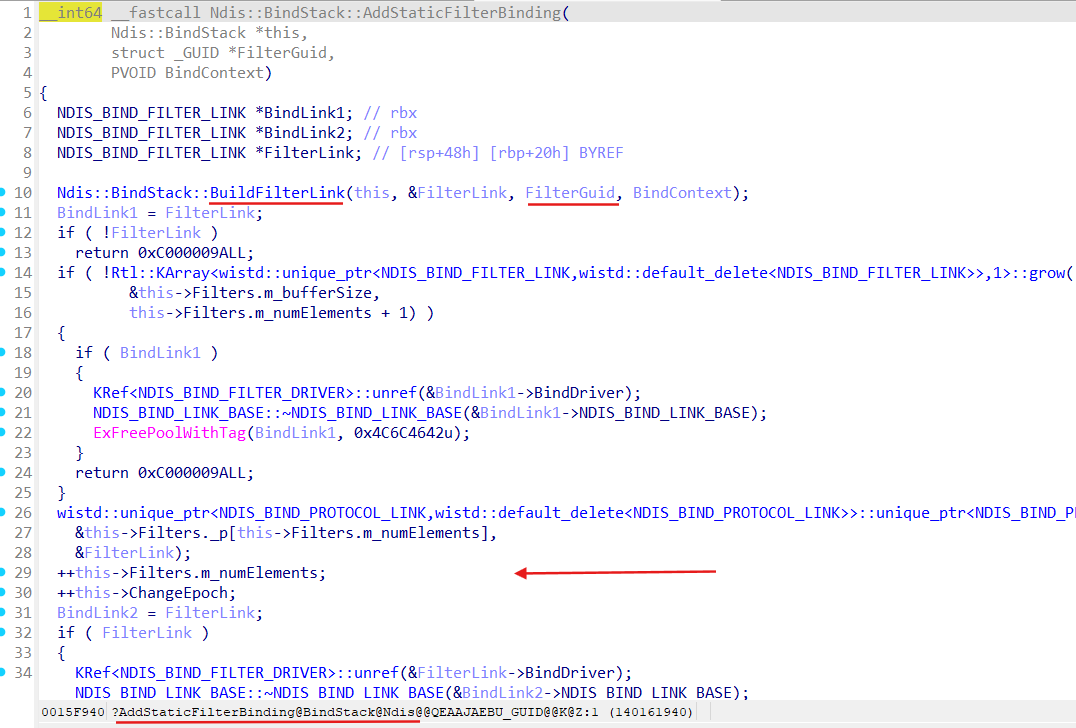
We can conclude that NDIS attach LWFs to the Miniports based on information established during LWF installation (by network configuration procedure and using filter’s INF file) stored in the HKEY_LOCAL_MACHINE\SYSTEM\ControlSet001\Control\NetworkSetup2\Interfaces{IFACE-GUID}\Kernel\FilterList regystry key.
LWF Registration
Consider simple LWF driver sample:
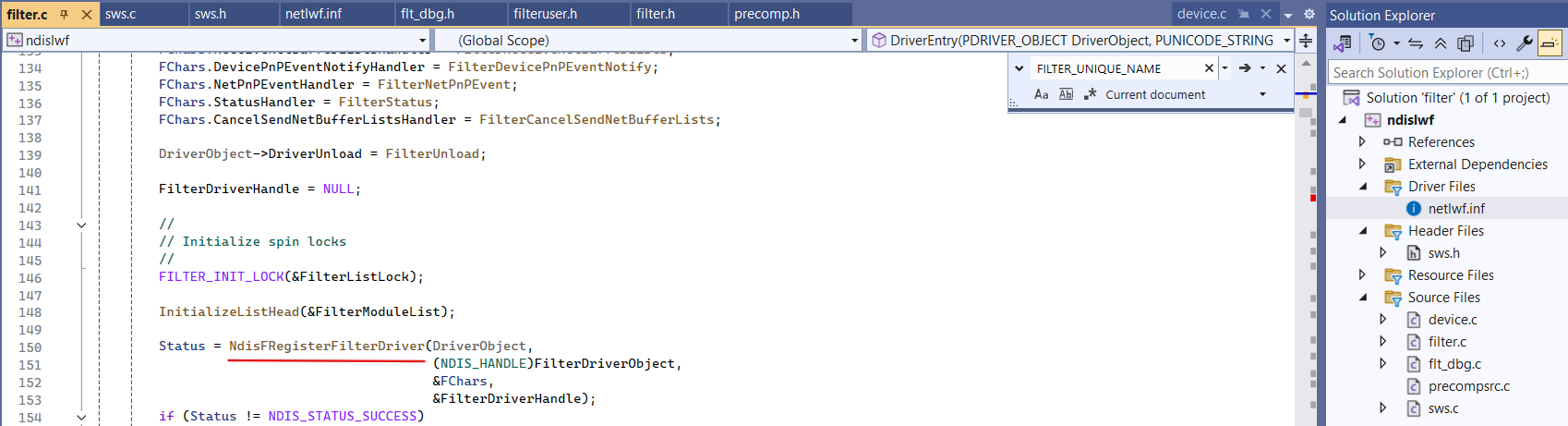
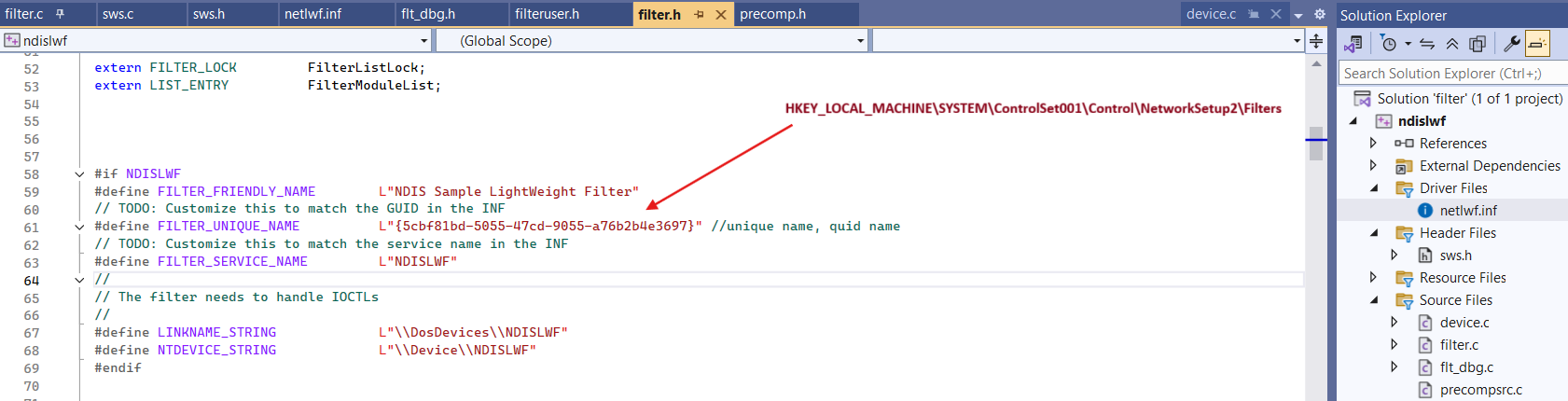
Remeber that FILTER_UNIQUE_NAME must match NetCfgInstanceId in the INF file for our LWF:
;-------------------------------------------------------------------------
; Installation Section
;-------------------------------------------------------------------------
[Install]
AddReg=Inst_Ndi
; All LWFs must include the 0x40000 bit (NCF_LW_FILTER). Unlike miniports, you
; don't usually need to customize this value.
Characteristics=0x40000
NetCfgInstanceId="{5cbf81bd-5055-47cd-9055-a76b2b4e3697}"

;-------------------------------------------------------------------------
; Ndi installation support
;-------------------------------------------------------------------------
[Inst_Ndi]
HKR, Ndi,FilterClass,, compression
HKR, Ndi,FilterType,0x00010001,2
; Do not change these values
HKR, Ndi\Interfaces,UpperRange,,"noupper"
HKR, Ndi\Interfaces,LowerRange,,"nolower"
HKR, Ndi\Interfaces, FilterMediaTypes,,"ethernet, wan, ppip"
When we register our LWF invoking NdisFRegisterFilterDriver it lands in NDIS.SYS driver:
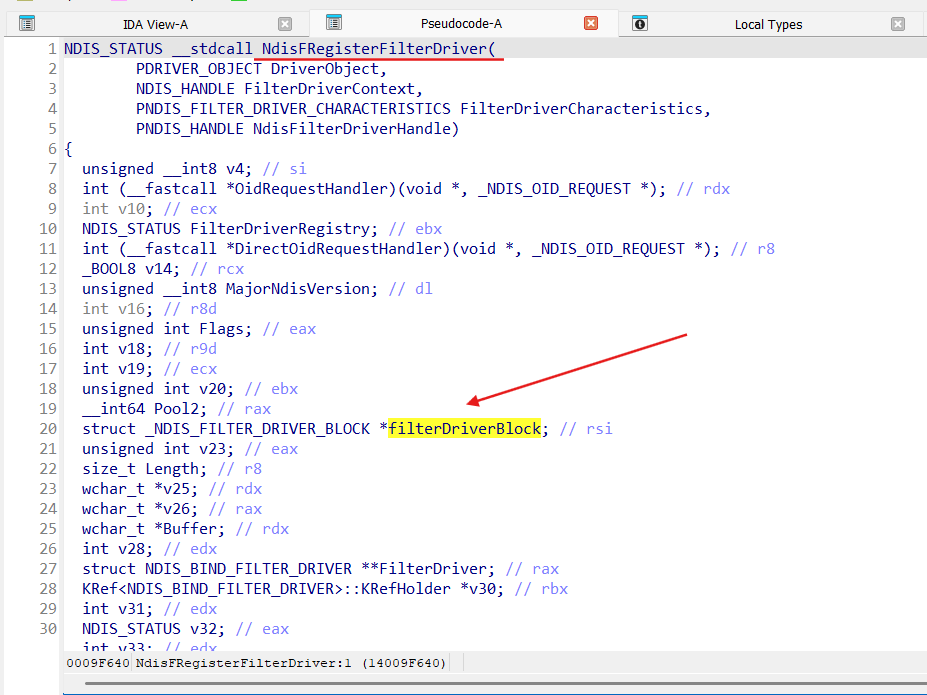
At the moment we invoke NdisFRegisterFilterDriver function NDIS already has buit all binding information for our LWF driver during its installation (via INF file) by Ndis::BindRegistry::Reload method. We get this binding information in view of the NDIS_BIND_FILTER_DRIVER object (via function ndisBindGetFilterDriver):
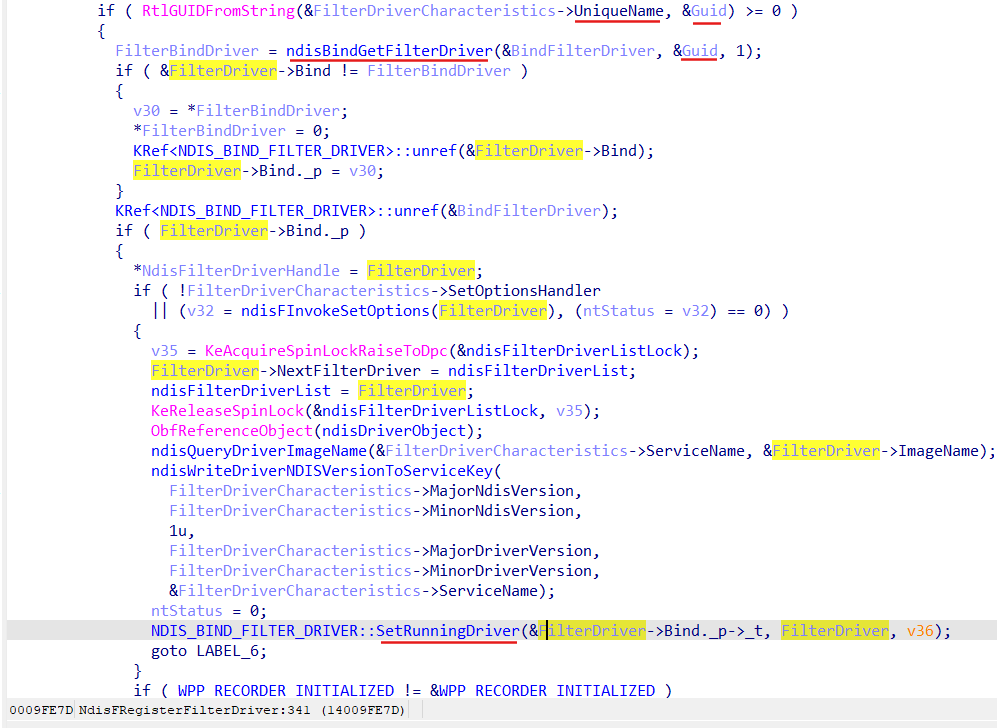
FilterDriverCharacteristics->UniqueName here is our filter FILTER_UNIQUE_NAME = {5cbf81bd-5055-47cd-9055-a76b2b4e3697}.
And eventually NDIS start attachment procedure for our LWF:
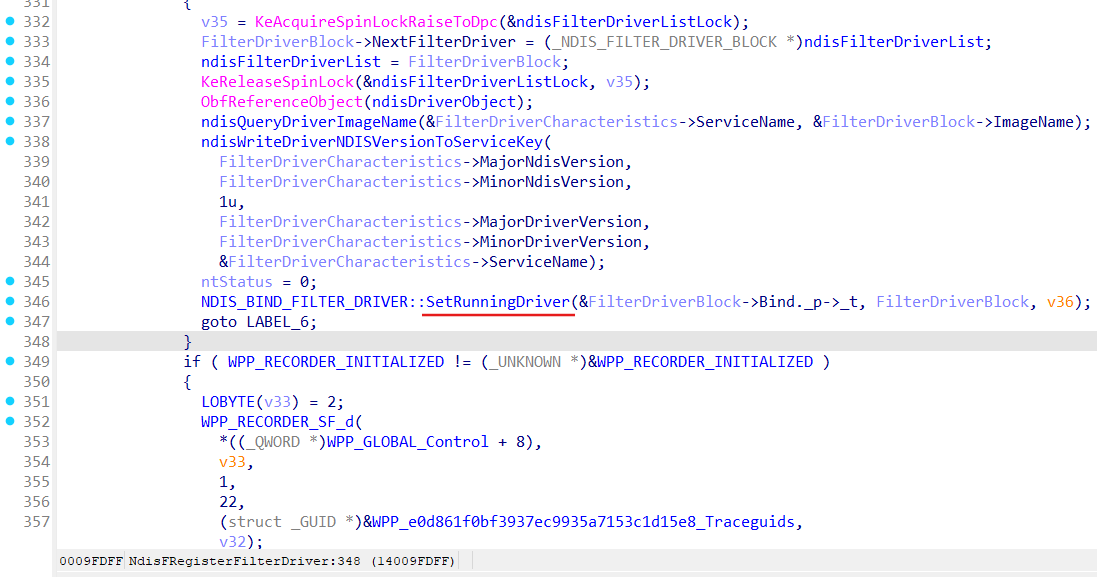
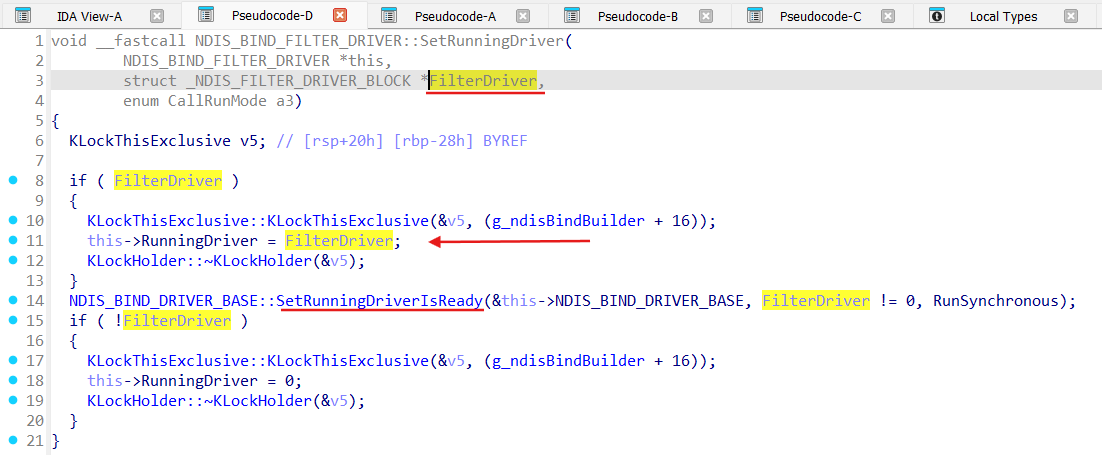
Function SetRunningDriver set RunningDriver as our LWF and invokes SetRunningDriverIsReady:
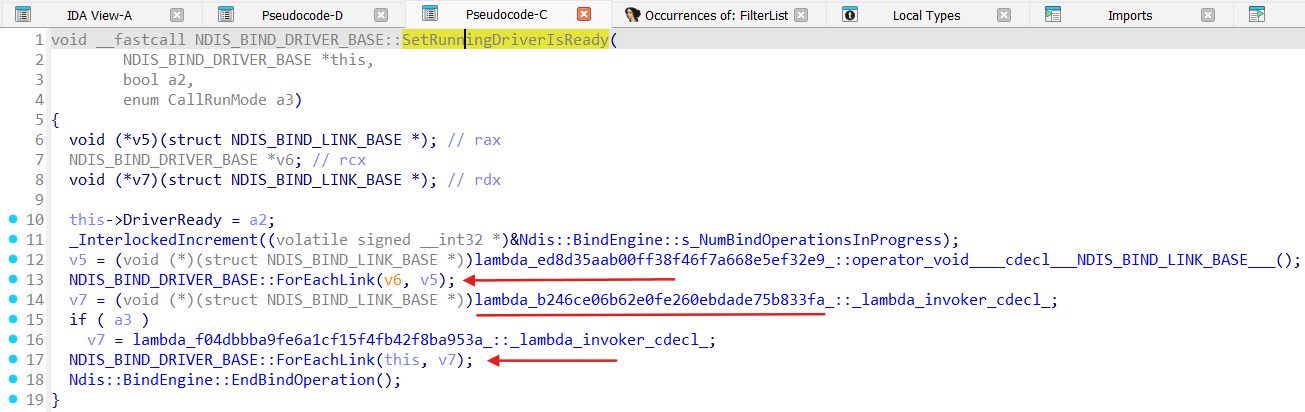
Under the hood of the lambda functions invoked by SetRunningDriverIsReady effectively Ndis::BindEngine gets run, especially ApplyBindChanges method (here as RunSynchronous):

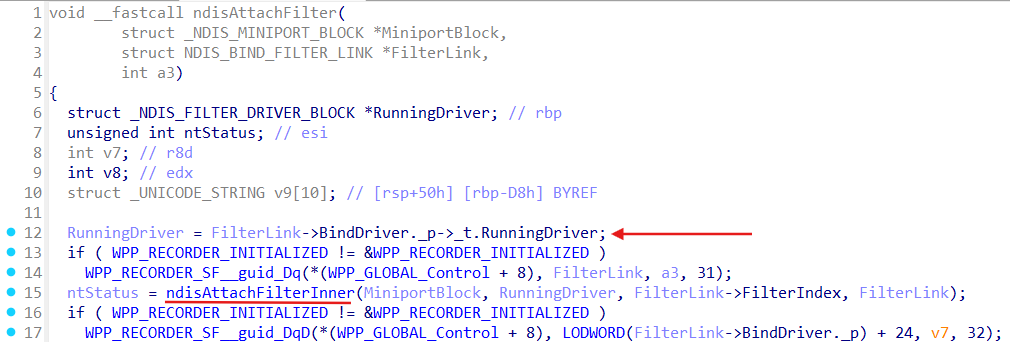
We already know that Ndis::BindEngine::ApplyBindChanges run actuall binding process by call to the Ndis::BindEngine::UpdateBindings method which eventually leads to the Ndis::BindEngine::Iterate, and all this sequence from the NdisFRegisterFilterDriver lands in the ndisAttachFilter:
ndisCheckForNdisTestBindingsOnAllMiniports
To control what LWFs can attach to our Miniport we should control HKLM\SYSTEM\ControlSet001\Control\NetworkSetup2\Interfaces{OUR-MINIPORT-GUID}\Kernel\FilterList registry key, removing unwanted filters from the list (one of the possible ways):
- check if unwanted filters are already in the FilterList, remove if so, issue something to trigger Ndis::BindRegistry::Reload;
To trigger Ndis::BindRegistry::Reload after modifications of the FilterList magic unexported function ndisCheckForNdisTestBindingsOnAllMiniports can be invoked:
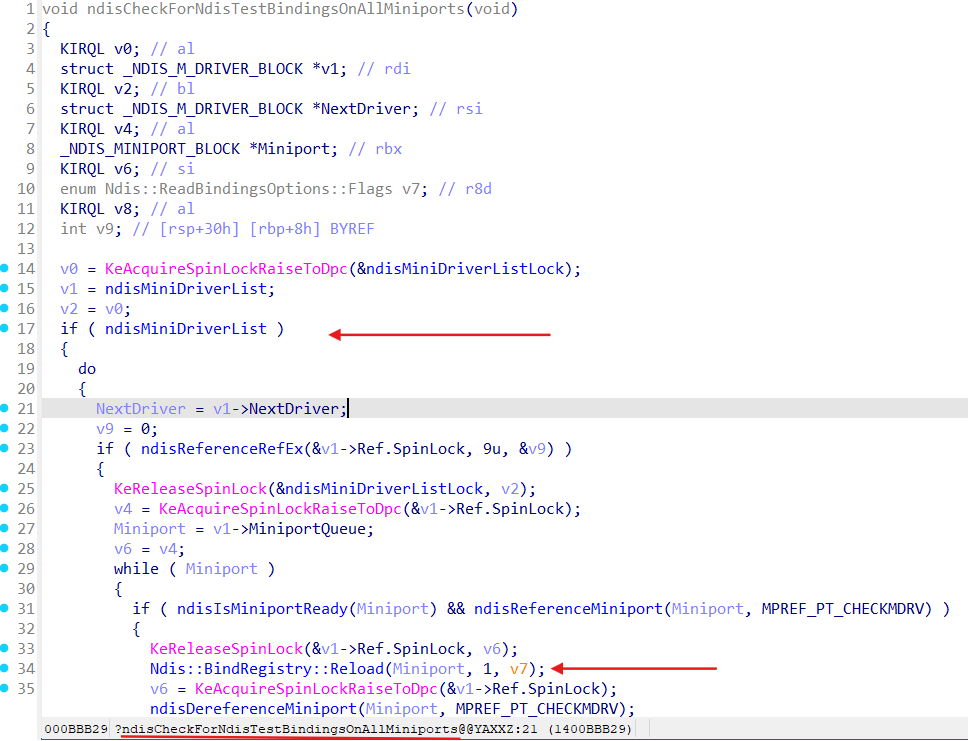
This function despite it is unexported can be invoked via NdisReEnumerateProtocolBindings function:
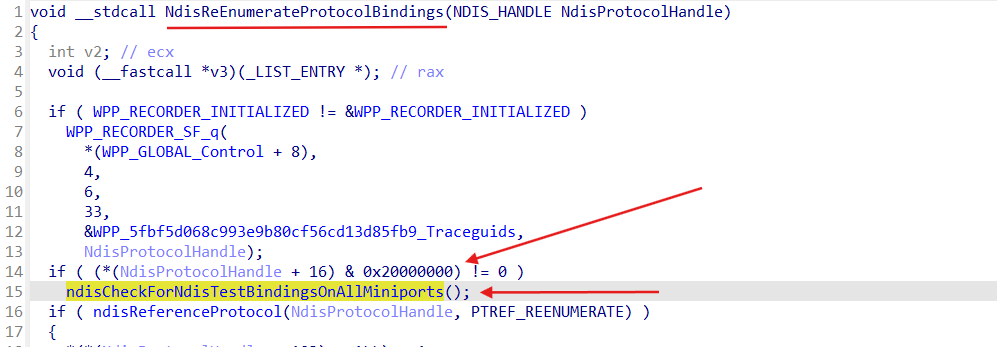
There are more simple and robust ways to run Ndis::BindRegistry::Reload, everything depends on the requirements:
- usage of the INetCfgComponentBindings::UnbindFrom method [ INetCfgComponentBindings ];
- control the operations to the with help of the CmRegisterCallbackEx with modification what can be stored, removing unwanted filters from the request [ CmRegisterCallbackEx ];
- issuing Refresh PnP reguest for an adapter;
- .etc